Research · September 2026
Building an AirBrush-style editor
We pulled AirBrush apart panel by panel, then searched GitHub for what already exists. Here are the projects worth building on — and the one that's closest to what you're after.
The short version
AirBrush's website advertises ~70 tools. The actual editor has 15, and every panel works the same way: no sliders, just a few named presets. Magic Retouch offers Natural, Smile, Clean, Delicate, Cute, Sculpted, Model — that's the whole trick.That matters because the presets are the product, not the AI. The models are all rentable (AirBrush itself rents Google's for its generative editing). So the job is a good UI plus a well-chosen set of presets — and there's an open-source project that already has exactly that shape.
The closest match
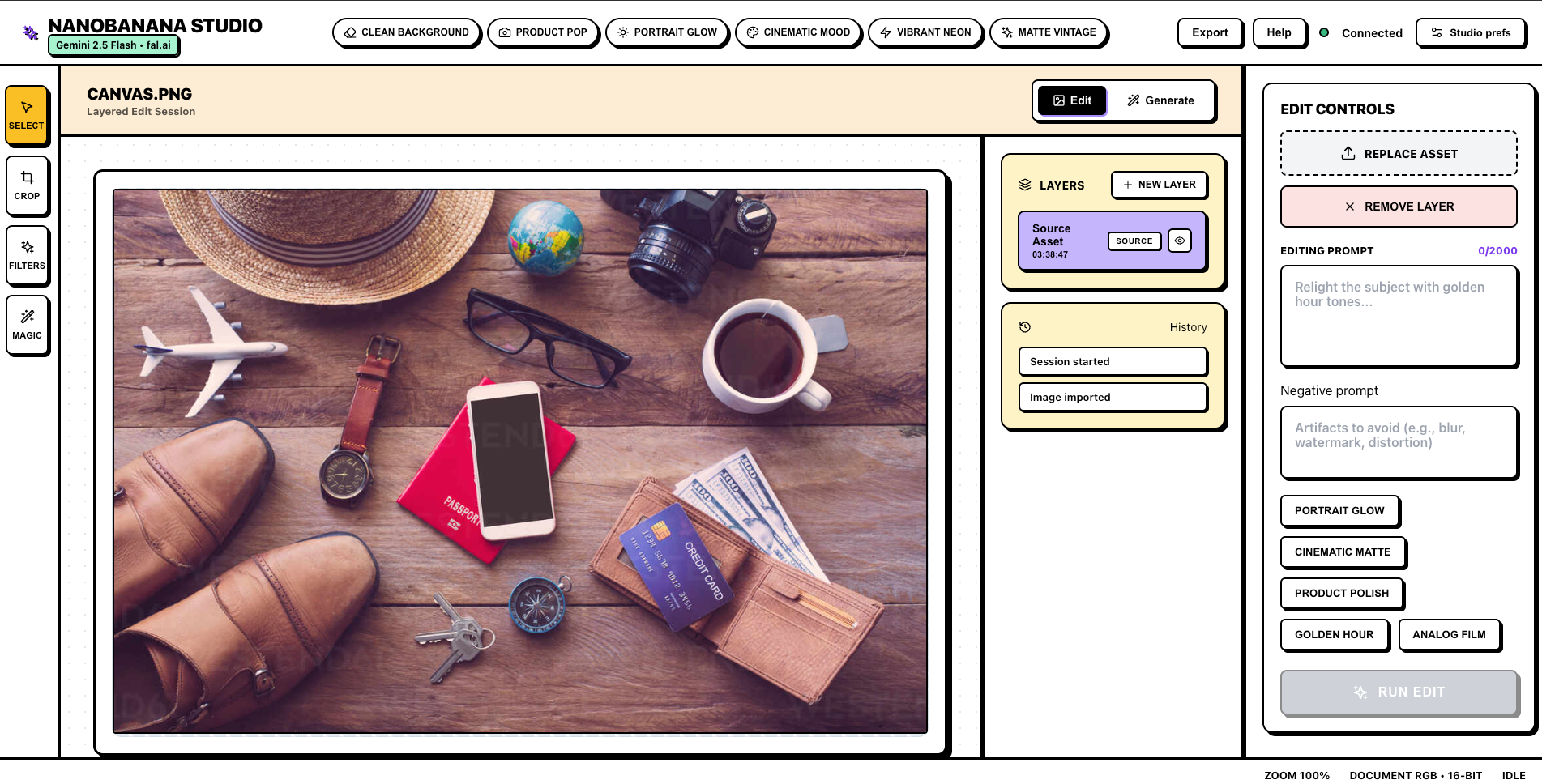
NanoBanana Studio — look at the top row: Clean Background · Product Pop · Portrait Glow · Cinematic Mood · Vibrant Neon · Matte Vintage. Those are named presets, exactly like AirBrush's. Plus a tool rail (Select/Crop/Filters/Magic), layers, history, and a model switcher. MIT licensed.
Why this one
It's already the right interaction model — pick a preset, hit run. Swapping the image model behind it is a single backend file, so it can point at Google, or any other provider, without touching the interface. The front end is a small React app, which means it can be restyled and dropped straight into an existing product rather than run as a separate tool.Everything else worth using
The editor
scaleflex/filerobot-image-editor
The only proper drop-in editor component. Crop with social ratios, brightness/contrast/warmth, filters, text, shapes, watermark, resize — all with no AI needed. Keeps edit history so you can reopen and change a previous edit.
Reference
CookSleep/gpt_image_playground
The most popular image-editing harness on GitHub. Generation plus editing over a hosted model. Worth copying patterns from — it's had the most real-world use.
Reference
replicate/zoo
Replicate's own playground for comparing image models side by side. Shows the right way to handle jobs that take a while — essential if you're processing a batch rather than one photo.
Reference
mrslimslim/gpt-image-canvas
A canvas workspace with a job queue and swappable image providers. Built on the same backend framework we'd use, so its structure transfers directly.
Gallery pattern
biagiomaf/smart-comfyui-gallery
A browser-based media library that runs AI on your images without leaving the gallery. This is the pattern for editing a whole shoot at once instead of one photo at a time.
Privacy option
yossdotpro/removerized
Background removal and upscaling that run entirely in the browser — photos never get uploaded anywhere. Useful for sensitive content that shouldn't leave the building.
Look only
fal-ai-community/infinite-kanvas
An infinite-canvas image editor. Nice ideas, but it has no licence file, so we'd look at it for inspiration rather than use the code.
The winner
amrrs/fal-nanobanana-studio
The one pictured above. A Photoshop-style editor with named presets and a model switcher, small enough to understand fully and adapt.
Person-specific editing — the precise layer
Why this matters more than a general editor
Most of the work here is on people — skin, hair, lips, brows, clothes. There's a class of open-source tool built exactly for that: face parsing. It identifies each region of a face separately — skin, hair, eyes, lips, nose, brows, neck — so an edit can be applied to just one region.That's the difference between "make this photo prettier and hope" and "smooth only the skin, leave the eyes and hair completely untouched." It's precise, repeatable and it doesn't redraw the person — which is what makes an edit look natural rather than AI-generated.
Core technique
face-parsing
Splits a face into its separate regions. Everything person-specific builds on this — smooth just the skin, recolour just the hair, brighten just the teeth. Runs fast and cheap, with no AI model rewriting the image.
Core technique
google-ai-edge/mediapipe
Google's face and body tracking. Finds facial features precisely and runs in real time, even in a browser. The industry standard — this is what most beauty apps are built on underneath.
Clothes
OOTDiffusion
Virtual outfit changing, from a published 2025 research paper. This is the same capability as AirBrush's clothes changer, and there are several mature alternatives.
Deterministic vs generative — worth understanding
Two very different ways to do the same edit:Deterministic (face parsing + image maths): smoothing skin, whitening teeth, recolouring hair, adjusting colour. Fast, free, runs on our own server, identical result every time, and it never changes the person's face. Most of what he uses is probably this.
Generative (an AI model redraws part of the image): changing hairstyle, swapping clothes, adding or removing objects. Powerful, but costs per image and can subtly alter a face.
The right build uses deterministic wherever possible and generative only where it's genuinely needed. That's cheaper, faster and more consistent — and consistency is what matters when the same person is edited every week.
Video
If video matters
OpenCut
A free, open-source CapCut alternative for cutting and exporting video. Note: it's a general timeline editor — it has no beauty, skin or face features at all, and the project is mid-rewrite right now. Relevant only if editing reels is part of the job.
Plumbing
imgproxy
Generates correctly-sized images on demand — thumbnails, and the right dimensions for each platform. Unglamorous but needed by any system holding a lot of photos.
Graphics
poster-design
A Canva-style designer for covers, promos and product images — for when the job is making a graphic rather than retouching a photo.
How AirBrush's tools map across
| AirBrush tool | How we'd do it | Notes |
|---|---|---|
| Crop + social ratios | Built into the editor | Free, instant, no AI |
| Adjust (brightness, contrast…) | Built into the editor | Free, instant, no AI |
| Photo filters | Built into the editor | Free, instant |
| Skin smoothing / blemishes | Face parsing → skin region only | Deterministic — face stays unchanged |
| Magic Retouch presets | Named presets, deterministic + model | Presets tuned to your own look |
| Magic Eraser / remove objects | Brush a mask → hosted model | Well-solved problem |
| Background remove / replace | One click | Can run free on our own server |
| Image enhance / upscale | Preset dropdown | Straightforward |
| Hair colour | Face parsing → recolour region | Deterministic — free and exact |
| Hair style change | Preset grid → hosted model | Generative — costs per image |
| Makeup (lips, brows) | Face parsing → recolour region | Deterministic — free and exact |
| Clothes changer | Virtual try-on model | Mature open-source options exist |
| Watermark, text, annotate | Built into the editor | AirBrush doesn't have these |
What we'd add that AirBrush can't
- Work on a whole shoot at once. Select forty photos, apply the same treatment to all of them. AirBrush charges extra for bulk and has no idea who your talent are.
- Everything stays in one place. No exporting, re-uploading, or hunting for the final version — edits save back against the right person automatically.
- Version history. Reopen any edit and change it later. AirBrush has none.
- Your own presets. Tuned to the look you actually want, adjustable any time without a developer.
- Sensitive content stays private. Anything that shouldn't go to an outside service gets processed on our own server instead.
Honest limitations
- The retouch look will be different. AirBrush is made by Meitu, who've spent 20 years on beauty filters. A general-purpose model is very good but not identical — worth comparing on real photos before committing.
- Preset previews cost more. AirBrush shows each look previewed on your own face. Doing that means generating every option up front, so we'd start with named buttons and add previews only if they're missed.
- Layout won't match exactly at first. The tools are all there; arranging them like AirBrush is styling work, not new features.